dobrovolskiy.com
RU
← all workAI · 2026 · Эта страница по-русски →

AutoGAD: Claude inside AutoCAD

An LLM agent docked inside AutoCAD 2025 that reads, audits and edits live drawings.

AutoGAD brings Claude right into AutoCAD 2025/2026: a chat palette on the ribbon, next to the drawing. Ask how many fixtures are on the plan, calculate the panel load, check the schedule against the drawing, replace the project code across the file — or say "draw a 6×4 m room plan with a door and dimensions" and paste a photo of a sketch for it to redraw. Every edit is shown to you before it touches the file. Free, open source AGPL-3.0, every version on GitHub. I use it every working day.

Download AutoGADSetup.exe ↓Releases on GitHubHow to connect Claude to AutoCADWindows · AutoCAD 2025 / 2026 · free, open source AGPL-3.0 · no admin rights
AutoGAD: Claude inside AutoCAD

Can Claude work in AutoCAD, check and draw?

Yes — with the AutoGAD plugin. A normal chat cannot open DWG files and cannot see your AutoCAD; the plugin does the reverse and brings Claude into AutoCAD. It sees the whole open drawing — layers, layouts, blocks, tables, text — and answers from what is actually drawn, not from a picture.

What it checks today:

  • Quantities. How many fixtures or devices of each type are on the plan — and whether that matches the schedule.
  • Schedules and bills of materials. Missing items, extra rows, inconsistent tags.
  • Layers. What is frozen or off, which objects sit on the wrong layer.
  • Text across the whole drawing. Project codes, sheet names, title blocks, leaders, table cells — find every occurrence and replace them in one confirmed pass.
  • Electrical and lighting calculations. Panel loads, design currents, breakers, cables — with the formula and the source data.

And it draws. From a description — "draw a 6000×4000 plan, 200 walls, a 900 door, dimensions" — it draws walls, doors, windows, dimensions, labels and hatches by layer, in the drawing's units, in one confirmed step. From a photo or scan of a sketch (📎, Ctrl+V) it redraws from the numbers, and traces a picture without dimensions into lines on your computer. Drawing from a description and from images arrived in version 1.0.8.

Codes and standards. Claude knows them and can check the current edition online; your company standards it remembers and applies. Every calculation is shown with the formula and the clause it relies on, so the engineer can check and sign.

What it does not do. It does not sign for the engineer and does not replace a survey: a trace of a photo follows the picture.

What Claude can do in your drawing

You type What happens
"How many VPD projectors and SKR linear fixtures are installed?" counts the real block references on the plan
"Calculate the panel load and pick breakers per outgoing line" a calculation with formulas from the schedule data
"Check the schedule against the drawing" compares the table with what is drawn, shows the differences
"Replace project code K2.AHP-2.2025 with K2.AHP-3.2025 everywhere" replaces in text, title blocks, leaders and tables — after your confirmation
"Freeze the telecom layers" layer management — confirmed too
"Draw a 6000×4000 room plan, 200 walls, a 900 door, dimensions" draws walls, door, dimensions and labels by layer — in one confirmed step
(pasted a photo of a sketch) "Redraw it at 1:1" redraws from the sketch's numbers or traces the picture into lines
"Rotate the selection 15° and copy it 2000 to the right" edits what is drawn: move, copy, rotate, mirror, offset
"Remember that I size cables for 380 V and cos φ 0.95" remembers it on your next projects

Before every edit a window lists the exact changes: Allow, Allow all this session or Reject. Plain Undo (Ctrl+Z) reverts any edit. Nothing is written into the file except what you approved.

Memory, cost and privacy

Memory. Claude remembers your rules and habits (voltages, cable types, how you like your answers) and the specifics of each drawing (project code, what layers and blocks mean, decisions made). The notes stay on your computer and survive renaming the file. Nothing is written into the drawing itself.

Where the drawing goes. Nowhere: the DWG file is not sent. Claude receives a short description of the drawing and your messages — nothing else. Nothing is sent to the plugin author: no telemetry.

Cost. The plugin is free. The model usually costs a few cents per question; the cost of every answer is printed under it.

Key. Stored encrypted on your computer under your Windows account.

Requirements

  • AutoCAD 2025 or 2026 on Windows. AutoCAD 2024 and older, and AutoCAD LT, are not supported.
  • A Claude key (Anthropic site) — or an OpenAI key if you want ChatGPT.
  • Internet access for the model's answers.
  • The plugin itself is free: open source AGPL-3.0, installer and every version on GitHub.

Working in FreeCAD? There is FreeGAD — the same Claude inside FreeCAD 1.0/1.1.

How to connect Claude to AutoCAD

Five minutes, no admin rights.

  1. Create a Claude keyOn the Anthropic site (console.anthropic.com → API keys) — takes a minute. The plugin is free; you only pay for the model's answers. Want ChatGPT — create an OpenAI key instead.
  2. Close AutoCAD and run AutoGADSetup.exeThe plugin installs into your Windows profile for every AutoCAD 2025/2026 you have. No admin rights needed.
  3. Paste the keyThe installer asks for it. Later you can change it inside AutoCAD: AutoGAD → API key. It is stored encrypted on your computer.
  4. Start AutoCAD and open the paletteAn AutoGAD tab appears on the ribbon; the Chat button opens the palette. Open a drawing and ask: "How many VPD projectors and SKR linear fixtures are installed?"
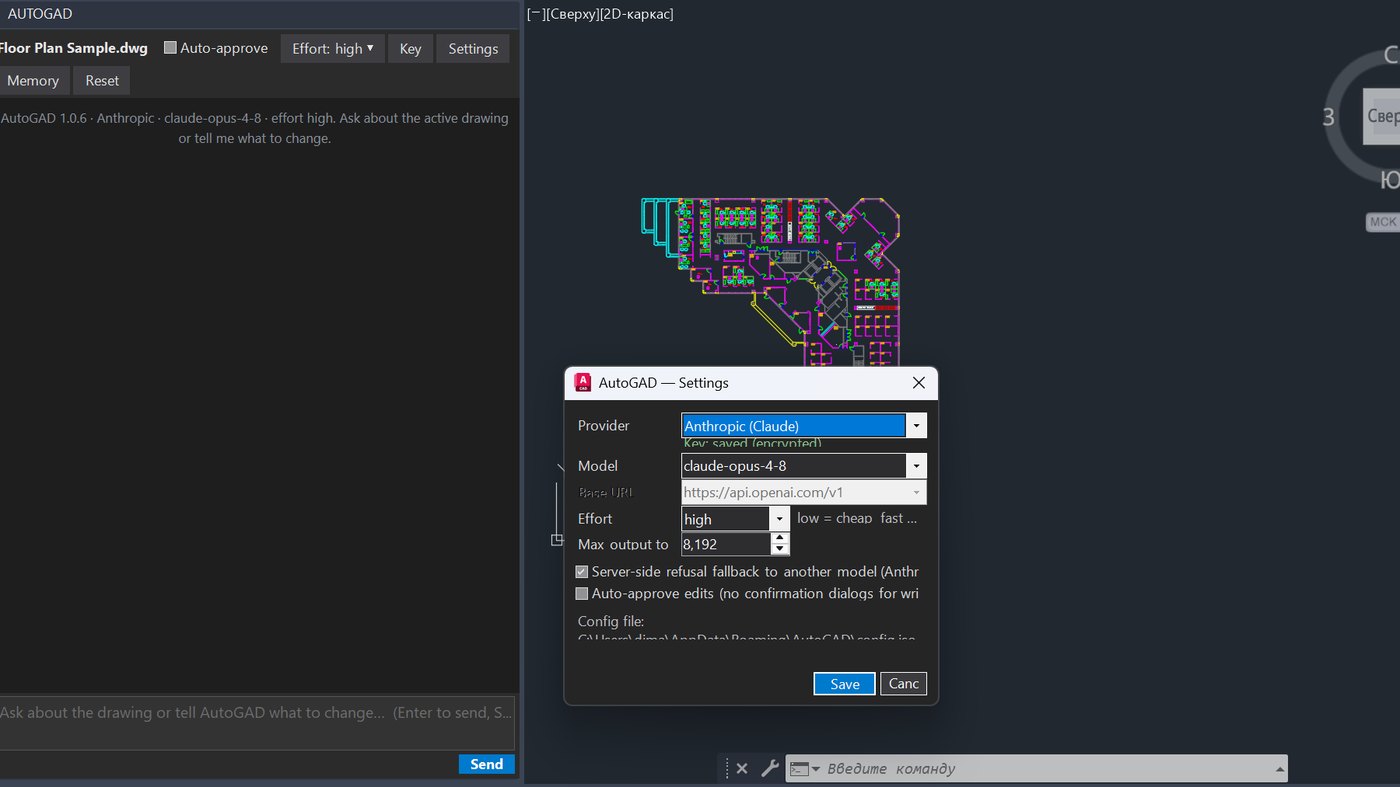
  5. Adjust if you likeAutoGAD → Settings: model, reasoning depth, auto-approve edits. For a whole department there is an all-users installer — also in the GitHub releases.

If the tab does not appear: start AutoCAD once under your account and reinstall the plugin. Anything else — the GitHub releases page, or me directly.

What it does

  • Ribbon tab + dockable palette with Markdown-rendered chat, effort selector and auto-approve toggle
  • Read tools: query_entities, get_block_inventory, get_layers, get_tables, get_context over the live DWG database
  • Write tools with confirmation dialogs: replace_text (text, attributes, MLeaders, table cells), set_text, create_text, set_layer_state, set_custom_property, run_command
  • Persistent memory keyed by drawing fingerprint GUID; per-turn and per-session cost reporting
  • Two installers: per-user Inno Setup EXE with registry demand-load, and per-machine WiX MSI shipping an Autodesk Autoloader bundle
  • Engineering-domain persona for Russian working documentation (loads, breaker sizing, cable checks)

Production-grade AutoCAD plugin used daily by the author as a design engineer; complete LLM tool-use loop with prompt caching, adaptive thinking and dual provider translation (tool_use <-> tool_calls); two installer technologies; version 1.0.5.

FAQ

Why can't I just upload the DWG to the Claude chat?

The chat cannot read DWG files and cannot see your AutoCAD. AutoGAD does the reverse: it brings Claude into AutoCAD, where it sees the open drawing and can edit it with your confirmation.

Is AutoGAD free?

Yes. Open source under AGPL-3.0, no fee for the plugin. You only pay for the model through your own key — usually a few cents per question, printed under every answer.

Can I use ChatGPT instead of Claude?

Yes. Pick OpenAI during install and paste an OpenAI key. Both keys can be stored at once and switched in Settings.

Does my drawing go to the internet?

The DWG file is never sent anywhere. Claude receives a short description of the drawing and your messages. Nothing goes to the plugin author — no telemetry.

Can it check a drawing against a code or my company standard?

Yes. It calculates and shows the formulas, checks the design against codes and standards — from what it knows and from the current edition online — and remembers and applies your company standards. The final check and signature stay with the engineer.

Does it draw?

Yes. From a description it draws walls, doors, windows, dimensions, labels, hatches and blocks — in the drawing's units, by layer, in one confirmed step. From a photo or scan of a sketch it redraws from the numbers or traces the picture into lines on your computer. Drawing from a description and from images arrived in version 1.0.8.

Does it work with AutoCAD 2024 or AutoCAD LT?

No. AutoCAD 2025 and 2026 on Windows are supported.

Will it work in AutoCAD 2027?

Tested on AutoCAD 2025 and 2026. AutoCAD 2027 is not verified yet; watch the GitHub releases — the update will appear there.

Do I need admin rights?

No. The plugin installs into your Windows profile. For a whole department there is a separate administrator installer.

Can it follow my company's standards?

Yes. Claude remembers rules right from the chat. Special checks for your blocks and schedules I build live on a call, billed by the hour.

Want something like this?

I build it live on a Zoom call, you watch the screen, the timer stops when you say stop. First 15 minutes are free.

$50 / hourBook an hour

Notes about this project

Can Claude draw in AutoCAD? Yes — a plan from a description and a drawing from a photoClaude in AutoCAD draws: describe a plan and get walls, doors, windows, dimensions and labels by layer; paste a photo of a sketch and it redraws it from the numbers or traces it into lines. Free AutoGAD plugin, open source AGPL-3.0, AutoCAD 2025/2026.ChatGPT in AutoCAD: a free plugin with your OpenAI keyThe free AutoGAD plugin brings ChatGPT (or Claude) right into AutoCAD 2025/2026: it answers questions about the drawing, calculates, checks schedules and changes text with your confirmation. All you need is an OpenAI key. Open source AGPL-3.0, releases on GitHub.How to connect Claude to AutoCAD in 5 minutes — the free AutoGAD pluginConnecting Claude to AutoCAD 2025/2026 is simple: download the free AutoGAD plugin, paste a key, open a drawing. Claude answers questions about the drawing, calculates, checks schedules and changes text with your confirmation. Open source AGPL-3.0, releases on GitHub.Does Claude work with AutoCAD? Yes — the free AutoGAD pluginClaude inside AutoCAD 2025/2026: the free AutoGAD plugin answers questions about the drawing, calculates, checks schedules, draws from a description or a photo and changes text across the drawing — all with your confirmation. Open source AGPL-3.0, installs in 5 minutes, releases on GitHub.Hire a developer to build an AI agent plugin for AutoCAD, FreeCAD or your engineering software — by the hour, liveLLM agents that live inside CAD: document snapshot, read tools, confirmed write tools, per-document memory, Claude or any OpenAI-compatible model, installers. Built live on a shared screen, billed per hour. Proof: AutoGAD (AutoCAD 2025, .NET 8) and FreeGAD (FreeCAD workbench, Python).

More projects

FreeGAD: Claude inside FreeCADA Claude-powered engineering copilot living inside FreeCAD.Evac: tow-truck detectorCustom-trained YOLO tow-truck detector on RTSP cameras with a serverless libp2p mesh.WUMO comic translatorScrapes a daily comic, translates the lettering with Claude vision and re-letters the image.